
SAP Integration Suite
OUR SERVICES
SAP Integration Suite
What is SAP Integration Suite?
SAP Integration Suite creates a unified system by seamlessly connecting components, data flows, on-premise and cloud environments, and real-world devices like sensors and mobile phones. As the successor to SAP PI/PO (Process Integration/Process Orchestration), it builds on proven capabilities and offers:
A unified integration hub for any organization, regardless of size or system landscape
An adaptable integration framework that supports future growth with flexible integration scenarios
Strong governance with policy enforcement, security standards, and structured integration for better visibility and control over data and system interactions
A tailored strategic approach, allowing businesses to align integration with their goals, adapt quickly, and stay competitive in a changing digital landscape
SAP Integration Suite Capabilities
Craft comprehensive integration scenarios
Establish connectivity beyond SAP
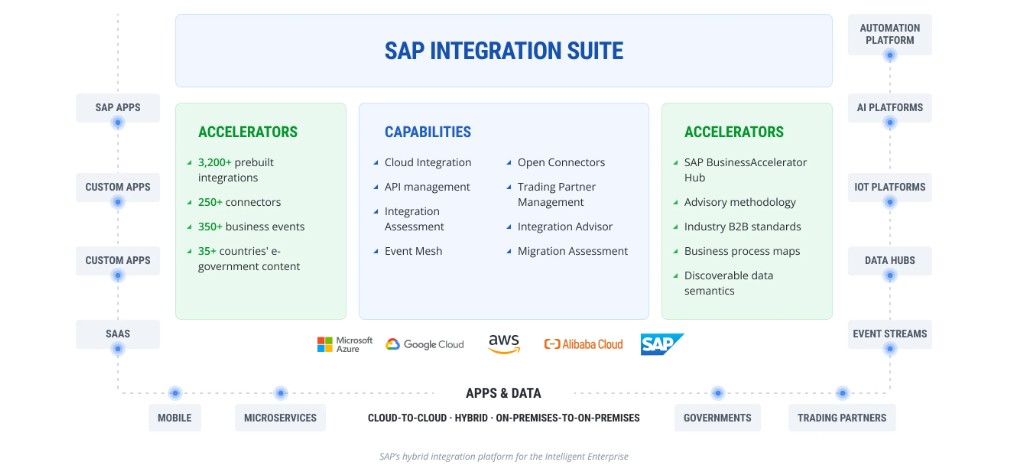
Empowering Seamless Connectivity and Innovation with SAP Integration Suite
Saptix Integration Suite is a powerful Integration Platform-as-a-Service (iPaaS) that enables fast integration of on-premise and cloud-based processes, services, applications, events, and data. This all-in-one platform speeds up innovation, automates various processes, and delivers quicker value.
The suite acts as a single, unified integration platform, allowing organizations to confidently integrate and automate processes across SAP and third-party systems. Its design helps users build modern, integrated applications easily using intuitive tools. The platform supports multiple integration methods and provides smooth access to popular third-party cloud applications.
Integration challenges addressed by Saptix Integration Suite include:
Streamlined compliance
Synchronization with B2B partners
Connecting different business processes
Scaled e-commerce
Fast API integration
Creating valuable customer insights
Future-proofing IT infrastructure
Automating the supply chain
Secure on-premise deployment
SAP Integration Suite key features
SAP Integration Suite from Saptix helps your business stay connected, innovative, and ready for the future. It uses AI-assisted integration to connect and manage more systems, extends automation to trading partners, and adapts supply chain connections as your business needs change. This ensures your organization can respond quickly to new opportunities and challenges, keeping your operations efficient and competitive.
SAP Integration Suite Potential: Domains and Solutions
Let’s explore different integration scenarios within SAP BTP to show how it connects various domains and solutions. The tables below present specific use cases grouped into seven main domains. Each domain highlights how SAP BTP integrates smoothly with SAP solutions and third-party applications. These examples show how Saptix Integration Suite acts as a strong and flexible hub, helping organizations connect cloud apps, on-premise systems, user-focused applications, and IoT devices to improve business processes, user experience, and data-driven decisions.
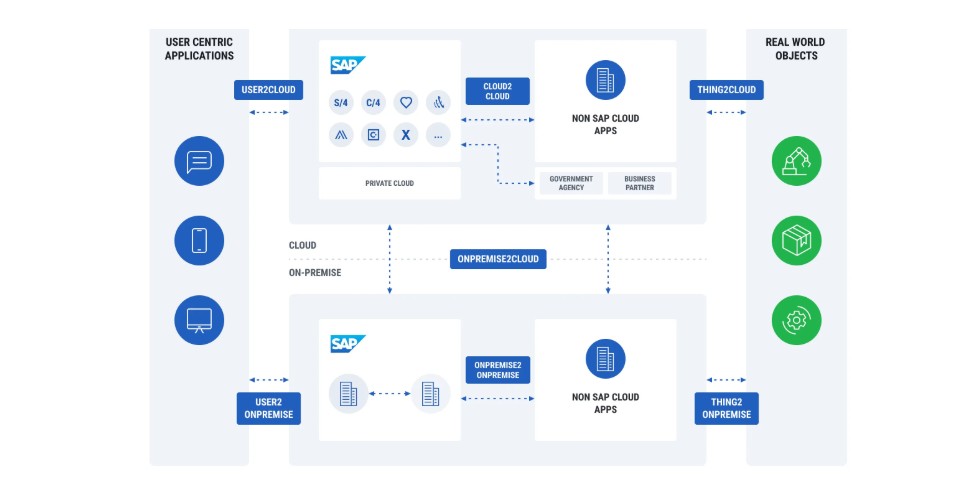
| Scenario | SAP and Third-party solution examples |
|---|---|
Cloud2Cloud Integrate third-party cloud services with cloud-based applications like SAP S/4HANA Cloud using BTP for seamless and real-time integration of core business processes. |
|
Cloud2OnPremise Use SAP BTP for building a connection between on-premise solutions such as SAP ERP or Enterprise software for a hybrid landscape that combines the benefits of cloud and on-premise systems. |
|
OnPremise2OnPremise Integrate on-premise business applications, such as SAP S/4HANA, to ensure smooth data flow and business process orchestration within the landscape where other on-premise applications are used. |
|
User2Cloud Connect cloud applications with user-centric applications. |
|
User2OnPremise Connect user-centric applications like Fiori with SAP BTP for an enhanced and personalized user experience across the enterprise. |
|
Thing2Cloud Connect IoT devices and real-world objects to SAP BTP for data ingestion, analytics, and real-time monitoring. |
|
Thing2OnPremise Integrate on-premise applications with IoT platforms to enable data-driven decision-making and automation. |
|
Saptix Knows How to Use the Power of the Business Technology Platform to Make Informed Decisions
Thanks to our experience with various SAP cloud solutions, Saptix can provide valuable guidance in selecting the right technologies before your project begins. We always consider your specific business scenario to ensure the best possible approach.
Our deep knowledge of SAP components and the entire ecosystem allows us to help you achieve strong business outcomes by turning data into real business value. We focus on maximizing the full potential of SAP Integration Suite, making your integration landscape not only efficient but also tailored to your unique needs.
Wherever you are on your integration journey, Saptix offers complete expertise and support. We cover both key scenarios: starting new projects with SAP Integration Suite and assessing or optimizing existing integrations.
Starting a project with SAP Integration Suite
Saptix has extensive experience in helping organizations smoothly onboard SAP Integration Suite. We begin by educating customers on its full capabilities, ensuring a clear understanding from the start. Building on this foundation, we assess integration scenarios, create strong integration plans, design future-state architectures, and configure systems for optimal performance.
Through agile execution, thorough testing, and a smooth cutover process, Saptix ensures a successful and efficient integration journey tailored to your business needs.
Support / Assessment of existing integrations
When supporting or assessing existing integrations, Saptix begins with a detailed review of your organization’s integration challenges and goals. Our team analyzes requirements, evaluates integration scenarios, and reviews documentation to identify areas for improvement. We then assess the current implementation, considering key factors such as data volume and connectivity.
Our expertise also covers infrastructure planning, thorough testing, and the setup of monitoring and maintenance protocols, ensuring your integrations deliver reliable and consistent performance over time.
FAQ
-
Which SAP BTP tools support integration?
The main SAP BTP tool for integration is the SAP Integration Suite, a flexible platform-as-a-service that connects SAP and non-SAP applications. It includes several powerful components: Cloud Integration: Builds and manages Integration Flows (iFlows) API Management & SAP Graph: Centralizes and controls APIs Integration Assessment: Provides recommendations for integration scenarios Event Mesh: Enables event-driven communication between platforms Open Connectors: Delivers predefined integrations with third-party tools Trading Partner Management: Simplifies onboarding and partner management Integration Advisor: Accelerates A2A and B2B integrations with automated proposals Migration from SAP Process Orchestration: Estimates the effort for migration Additionally, pre-built content such as integration accelerators, API Business Hub artifacts, and predefined iFlows simplify implementation and speed up results.
-
What solutions does SAP BTP offer for big data processing?
SAP BTP provides advanced big data solutions through: SAP HANA: An in-memory database for high-speed data processing SAP Data Intelligence (part of the Data & Analytics pillar): Connects and orchestrates data across complex landscapes to derive actionable insights
-
How is data security ensured when integrating with SAP BTP?
Data security within SAP BTP is ensured through: SAP Cloud Identity Access Governance for identity and role-based access control Encryption of data during transfer and storage Strict security frameworks ensuring compliance with data protection regulations For hybrid requirements, SAP Edge Integration Cell extends Integration Suite into private landscapes, allowing organizations to run integrations on-premises. This keeps sensitive data within local infrastructure while still being managed from the cloud, offering flexibility, scalability, and alignment with data residency requirements.
-
How to get support for integration with SAP BTP?
For support, organizations can use: SAP Community forums and knowledge-sharing hubs SAP Help Portal documentation and best practices Direct access to SAP Support services For tailored guidance, Saptix offers specialized consulting with deep expertise in SAP BTP. Our experts help design and execute integration strategies that fit your business needs.
-
What are the steps to start integrating with SAP BTP?
To get started: Define your integration requirements. Select the right SAP BTP tools, such as SAP Integration Suite. Use SAP BTP documentation and resources for guidance. Partner with an experienced SAP consultant like Saptix to ensure a seamless integration journey. When deploying SAP Integration Suite, multiple options are available, and choosing the right approach is crucial. Saptix experts can guide you with detailed insights tailored to your organization’s situation.