

83 / 100 SEO Score
OUR SERVICES

SAP Fiori

Some traditional SAP applications can feel complex, making everyday tasks harder for users. With SAP Fiori, these daily workflows can be simplified and made easier to use. Saptix helps you implement SAP Fiori for a better user experience.

Why SAP Fiori?

SAP Fiori is the modern user experience (UX) for SAP software, designed to simplify how people use business systems. With role-based apps that work smoothly on any device, Fiori lets teams focus on their tasks without struggling through complex interfaces. Whether you’re approving purchase orders or reviewing reports, SAP Fiori makes daily work faster, easier, and more productive.

Why SAP Fiori is a smart choice:

  • Consistent, streamlined experience across all SAP systems

  • Increased productivity with fewer clicks and quicker access

  • Access your apps anytime, anywhere, on desktop or mobile

  • Shorter training time due to its intuitive design

  • Real-time data insights for faster, better decisions

SAP Fiori Implementation & Development Services

At Saptix, we leverage cutting-edge industry technologies, platforms, and tools. We combine hands-on experience delivering software for agile startups with strong technical and business expertise in building SAP-powered business processes and solutions for large enterprises. As early adopters of SAP Fiori, we follow proven SAP development practices and stay updated with the latest advancements. Additionally, as an SAP strategic partner, Saptix collaborates closely with SAP to develop Fiori apps for SAP S/4HANA and other SAP solutions.

Sap Fiori App Development Services

SAP Fiori App Development Services

With deep insider knowledge of SAP software, Saptix ensures that SAP’s best practices and recommended methods are followed when developing custom Fiori apps. As pioneers in SAP Fiori development, we apply proven techniques on customer projects to guarantee quality and compliance with Fiori Guidelines. This approach delivers a seamless user experience, blending standard SAP Fiori apps with those developed by Saptix.

Fiorization Based On Sap Fiori Design Principles

Fiorization Based on SAP Fiori Design Principles

As a strategic SAP partner with over 20 years of collaboration, Saptix performs a comprehensive redesign process called ‘fiorization’ to create a tailored customer experience aligned with Fiori design principles. As an SAP AppHaus member, we are authorized and experienced in running design thinking workshops to identify the best way to apply fiorization to business processes or apps within your organization.

Sap Fiori Integration &Amp; Support Services

SAP Fiori Integration & Support Services

Our team is ready to address any challenges that arise during fiorization or ongoing maintenance. We offer end-to-end services—from assessing your current setup and requirements to providing post-launch support for your SAP Fiori solution.

Sap Fiori Workshops

SAP Fiori Workshops

At Saptix, we prioritize transparency and understand that users are central to any process. We listen carefully to those using our software. To ensure smooth collaboration between business users and our team, we conduct workshops to gather user needs and showcase the capabilities of SAP Fiori.
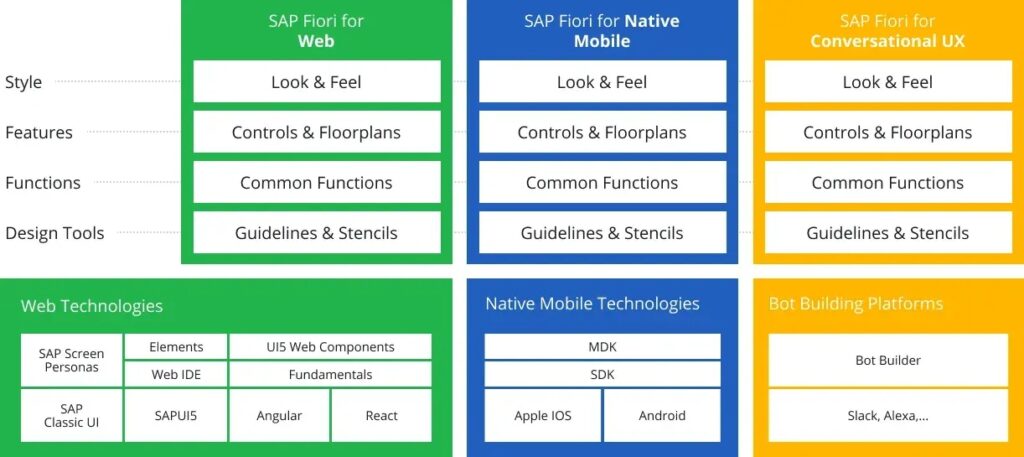

What kinds of SAP Fiori apps we develop

We specialize in creating SAP Fiori applications customized to your business needs and user requirements. Our apps help streamline processes, enhance decision-making, and offer deep insights into key business assets.
Transactional Apps
Transactional Fiori apps let users handle routine tasks like creating, viewing, updating, and deleting records—for example, creating sales orders, approving purchase orders, or entering timesheets. These apps can be built using Fiori elements, which use OData service metadata and CDS annotations to minimize UI coding. For more customization and design flexibility, the SAPUI5 freestyle approach offers full control over the user experience.
Read More
Analytical Apps
Analytical applications deliver insights and visualizations by analyzing large data sets, simplifying decision-making and providing a clear view of the situation. Examples include financial reports, sales dashboards, and operational summaries. Using Fiori Guidelines’ recommended floorplans like Overview Page and Analytical List Report, we highlight key tasks and information for specific user roles. Business intelligence features like drilldown and slice-and-dice help users quickly analyze data and respond effectively.
Read More
Fact Sheet Apps
Fact Sheet Fiori apps offer detailed information about key business objects, giving users a clear and organized view. Examples include comprehensive profiles of customers, products, or suppliers that show their attributes, relationships, and transaction history. Following Fiori Guidelines, we use the Object Page floorplan to present complex data in a structured, easy-to-use format, helping users quickly find relevant information and make informed decisions.
Read More

Stay Ahead with the Latest SAP Fiori Versions

We at Saptix started working with Fiori from its early days. By keeping up with the latest trends and updates, we have continuously reviewed and adopted Fiori’s innovations up to the present.

Business Benefits of SAP Fiori

SAP Fiori can enhance your team’s work by providing a modern user experience that boosts productivity and engagement. From quicker onboarding to streamlined core processes, SAP Fiori solutions help you achieve more with less effort.

Here are some key benefits you can expect.

Cross-platform compatibility
Use SAP Fiori apps on any device—desktop, tablet, or phone—with a responsive design that fits every screen.
Read More
Adjusted for business needs
Easily handle daily tasks like approvals, reporting, and workflow setup with simple, role-based apps.
Read More
Easy to learn and use
All SAP Fiori apps follow a consistent design, making it easy for users to navigate and learn each app.
Read More
Seamless workflows
Get the information you need quickly and complete routine tasks faster—anytime, anywhere.
Read More
Increased productivity
The SAP Fiori Launchpad keeps your work organized, letting you pick up where you left off without losing track.
Read More
Clean core and SAP BTP-ready
Create and run custom SAP Fiori apps on SAP BTP while keeping your core ERP clean and ready for the future.
Read More

Frequently Asked Questions About SAP Fiori

Our Approach to SAP Fiori Implementation

At Saptix, we ensure consistent UI/UX by following SAP Fiori Guidelines. As a member of SAP AppHaus, we hold focused design thinking workshops and consistently receive positive feedback by actively listening to our users’ needs.

SAP Fiori design languages

Sap Fiori Design Languages 1

Key Features of SAP Fiori Technology

Responsive design
Run applications on any screen size and orientation Access data anytime, anywhere, on any device (web, mobile, or PWA) Enjoy a consistent user experience across all SAP Fiori applications
Read More
Role-based access
Protect data from unauthorized access Define access levels based on user roles Create custom roles with specific permissions
Read More
Simple to use
Learn SAP Fiori quickly with reusable components Perform complex tasks easily with intuitive workflows Work on multiple tasks from a single launchpad
Read More
Better user experience
Navigate tools and apps without difficulty Complete tasks quickly with simple menus and clear thumbnails Stay productive through easy operations and fast data access Centralize actions in one place for higher efficiency Reduce costs with shared core components across Fiori apps
Read More
Fiori Notifications
Instantly view notifications as they appear in the Notification Center Configure notifications to display individually or grouped by type Manage notifications with priority settings and quick actions (approve, reject, confirm, etc.)
Read More
Fiori Personalization
Adjust groups, tiles, date/time, language, and appearance on the Fiori Launchpad Apply filters tailored for each application type Customize tables by reordering, sorting, grouping, and filtering columns Choose from 20 chart types to match your analysis needs Organize cards easily using drag-and-drop functions
Read More

FAQ

  • What is SAP Fiori?

    SAP Fiori is a user experience (UX) design framework that simplifies the SAP interface across desktops, tablets, and smartphones. Its usability depends on how well it is implemented.

  • What are the benefits of using SAP Fiori?

    Improves productivity with a simple and intuitive interface Reduces user training time Provides access to SAP applications anytime, from any device

  • Is SAP Fiori available for all SAP applications?

    Yes. SAP Fiori is available for most SAP applications, including SAP S/4HANA, and can be tailored to specific business requirements.

  • What role does SAP Fiori play in SAP S/4HANA?

    SAP Fiori is the default interface for SAP S/4HANA. It delivers a modern user experience and helps streamline business workflows.

  • Can we customize SAP Fiori?

    Yes. Fiori can be customized according to user roles, tasks, and workflows using SAP Business Technology Platform (BTP) tools.

  • What is the difference between SAP GUI and SAP Fiori?

    SAP GUI: Has a more complex, traditional layout. SAP Fiori: Designed to be simple, role-based, mobile-friendly, and task-oriented.

  • How does SAP Fiori work?

    SAP Fiori is based on simplicity, consistency, and a user‑focused design. It uses HTML5 and SAPUI5 technologies to ensure a responsive layout across devices. Powered by SAP BTP, it integrates tightly with SAP back-end systems such as SAP S/4HANA. Uses OData protocol for real-time data access between the UI and SAP systems. Provides a role-based interface, so users see only tasks and data relevant to them. Reduces complexity, improves speed, and lowers training needs.

  • How is SAP Fiori used?

    SAP Fiori simplifies and streamlines business processes across functions like finance, supply chain, HR, and customer management. For example, users can: Approve invoices Track orders Manage employee records It also supports digital transformation by allowing organizations to build custom, mobile-friendly apps. This enables employees to work from anywhere, improving productivity, decision-making, and overall user satisfaction.

  • Can SAP Fiori translate languages?

    Yes. SAP Fiori supports over 40 languages and allows users to work in their preferred language. Language is set in the user’s SAP profile and reflected in the Fiori interface. Developers can enhance translations through SAP Translation Hub or SAP Web IDE. Fiori doesn’t perform real-time translations (like speech-to-text), but relies on SAP’s localization tools for multilingual support.

  • Does SAP EHP7 support Fiori?

    Yes. SAP ERP Enhancement Package 7 (EHP7) supports certain Fiori applications. Requires installation of SAP Gateway and SAPUI5 components. Features and app availability are limited compared to SAP S/4HANA. Organizations often use Fiori with EHP7 to improve user experience, but for full functionality, migration to SAP S/4HANA is recommended.