Moderation note: The tutorial, described in this blog post doesn’t work anymore. Please visit https://developers.sap.com/tutorials/cos-getting-started-trial.html for more information and an updated Getting Started Tutorial.
Target audience
Then look no further. This blog post is exactly for you! What is SAP Customer Order Sourcing?SAP Customer Order Sourcing is a public cloud service based on SAP Cloud Platform and offers
Read more about SAP Customer Order Sourcing from this interesting blog post by ingo.woesner What you will learn in this blog post (no coding required)
1 What are the required master data for SAP Customer Order Sourcing? SAP Customer Order Sourcing needs to know which and how many of a product are available (we call it availability raw data) in which locations (we call it sources).
|
Business Scenario
|
For a better understanding of SAP Customer Order Sourcing, let's have a look at the following, very simplified Business Scenario: You are the owner of an E-Commerce (or web shop owner) Business in the Fashion Industry with these characteristics (which is the required master data for the service):
As a Business Owner you want to reduce delivery cost of each order and therefore decide for the following Sourcing Strategy:
|
||||||||
Let’s start to implement your first Sourcing Strategy for your business.
Prerequisite
| The first thing you need is an SAP Cloud Platform Trial Account. If you don't know how to setup a trial account, follow these steps. |
Step 1: Subscribe to SAP Customer Order Sourcing Application
Now you can activate SAP Customer Order Sourcing service for your trial account:
Note: Before you can access the Strategy Builder, you need to assign read and write permissions to your user, so that you can design a new strategy.
Access Strategy Builder:
|

 to create a strategy.
 in the top right corner?
Step 2: Create a Service Instance
To upload the required master data via API (Step 3), you first need to create a Service Instance and a credentials:
Create credentials for your service
You can now use your credentials to upload Master data into SAP Customer Order Sourcing via REST API:
|
Step 3: Upload master data
Step 3.1: Upload sources
Step 3.2: Upload Availability Raw data
|
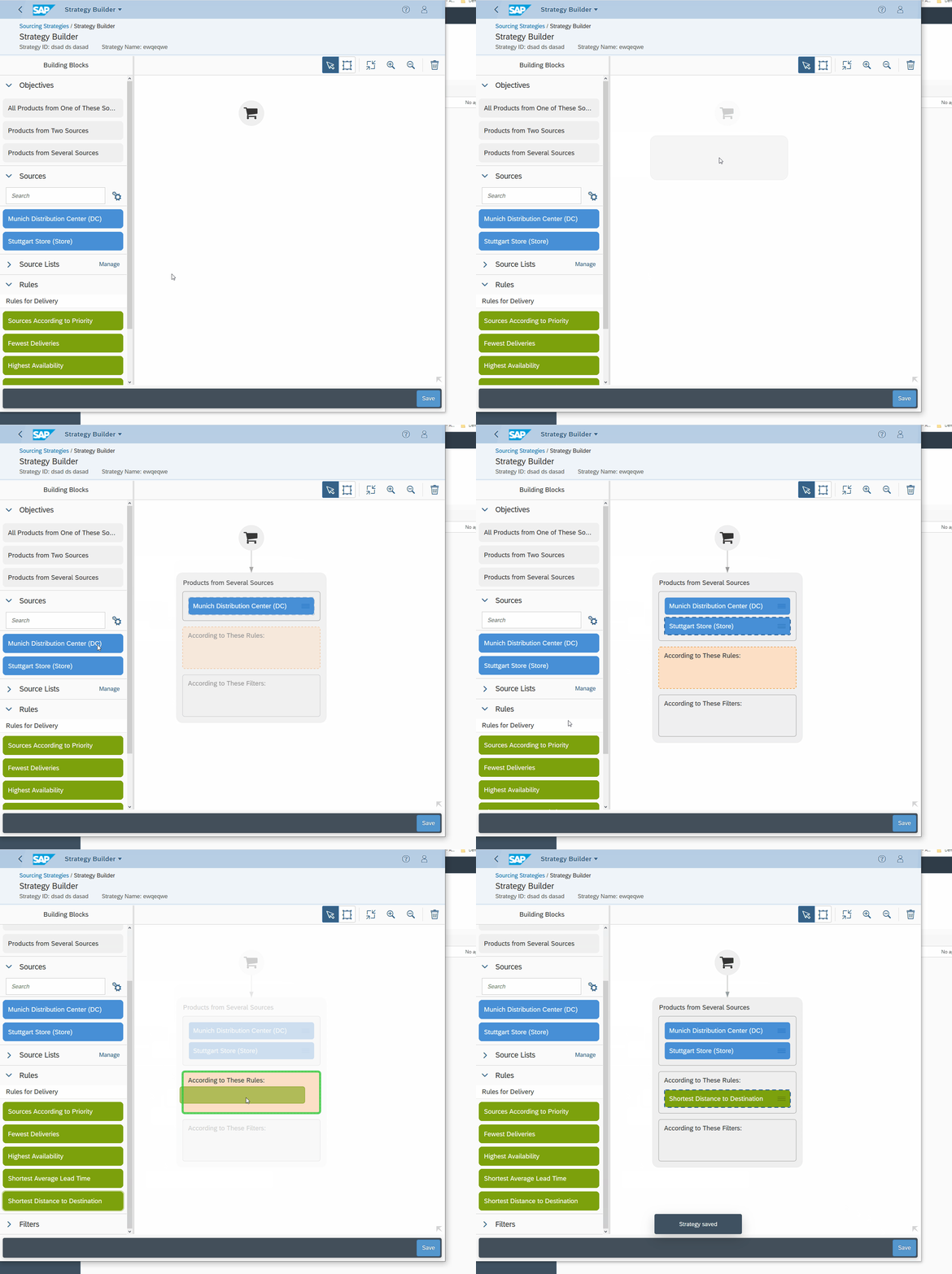
Step 4: Model your strategy
Hint: The box where the building block is supposed to go is highlighted when you drag them onto the canvas.
The modelled strategy says: For a sourcing request with this Strategy:
In other words:
Now let’s test our strategyScenario: A Customer Located close to Stuttgart orders a Red_T-shirt. Desired Sourcing Result: Red_T-shirt should be sourced from Stuttgart since it is closer to the customer than Munich. let's check if this is the case
In the sourcing result you see that the Red_T-shirt should be sourced from stuttgart_store.
|
An optional task for you:Create a sourcing request for this scenario to test your strategy: Let us know in comments, how your sourcing request and your response looks like. Good Luck! |
In this post I have shown you, how to…
Of course, SAP Customer Order Sourcing has more capabilities like:
We will post further How-To's to demonstrate other capabilities of SAP Customer Order Sourcing. |
You want to learn more?