Joule Studio Versus Joule – HCM Focus
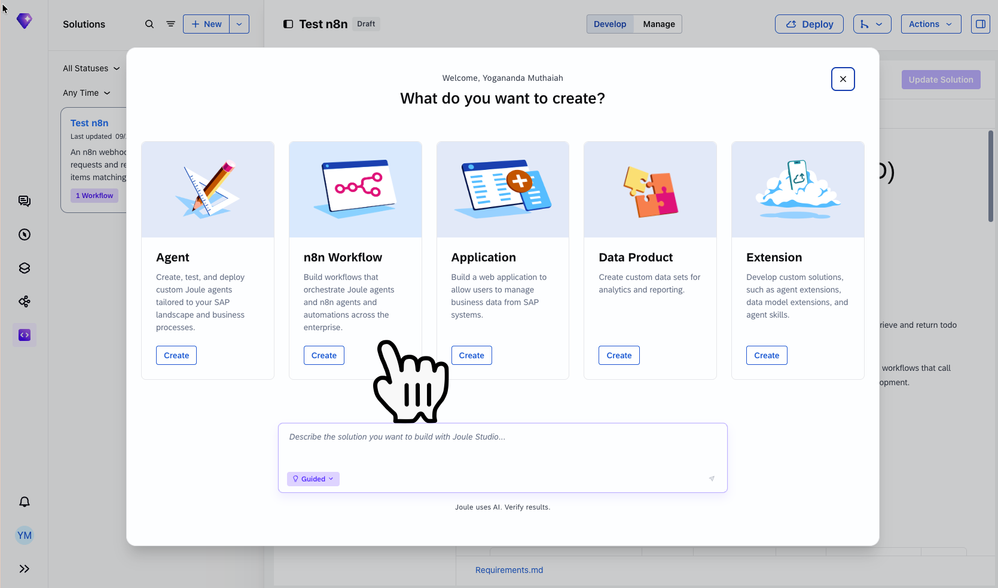
Joule Studio is the factory | Joule is the product, employees experience Joule For an HR employee approving a leave request, Joule is the AI assistant that answers in plain language. For a developer
Are you need IT Support Engineer? Free Consultant
Joule Studio is the factory | Joule is the product, employees experience Joule For an HR employee approving a leave request, Joule is the AI assistant that answers in plain language. For a developer
AI has exploded across industries in the last year+, yet we continue to see headlines about AI deployment failures. This is NOT because AI does not work, but rather because
Since three years, SAP IT uses SAP Advanced Event Mesh for internal projects . Over time, its usage has grown to more than 70 projects.One of the use cases for
In my previous post on multi-turn conversations with Joule, I showed how an A2A agent can use contextId and taskId to ask follow-up questions and stay in the conversation across
What’s New for SAP Integrated Product Development Welcome to the April 2026 blog! This update introduces powerful enhancements designed to accelerate innovation, strengthen collaboration, and improve efficiency across the product
このブログシリーズは、SAP Business Data CloudのSeamless Planningの全体像を一通り把握していただくことを目的としています。 このシリーズは、次の以下で構成されます。Part1 : Seamless Planningとは?(本ブログ)Part2 : Seamless Planningで計画モデルを作成してみようPart3 : Seamless PlanningでSAP Datasphereの実績ビューをライブバージョンで参照しようto be continued … 本ブログ「#1 Seamless Planningとは?」では、Seamless Planningで「何ができるのか」「どんなアーキテクチャなのか」「どんな場面で使われるのか」を解説します。 目次 Seamless Planningとは Seamless Planningのメリット
When I first started working with SAP Analytics Cloud (SAC), I did what most people do – I jumped straight in. I had data, I had a business problem, and
Seu landscape de SAP S/4HANA Public Cloud pode estar rodando sem monitoramento — basta um clique para resolver. Se você está em SAP S/4HANA Cloud, Public Edition como parte da
Su entorno de SAP S/4HANA Cloud, Public Edition podría estar funcionando sin monitoreo — basta un solo clic para solucionarlo. Si usted está en SAP S/4HANA Cloud, Public Edition como
Puede que tu landscape esté funcionando sin monitoreo — aquí te mostramos cómo cambiarlo en 30 minutos. Si estás en SAP S/4HANA Private Cloud bajo RISE with SAP, SAP Cloud