In Maintenance and service-based industries, having the right people and resources in the right place is important to keep work running smoothly and on time. Organizations using SAP S/4HANA Cloud Edition use Work Centers to define the teams, workshops, and resources responsible for maintenance activities. They also maintain details such as available working hours, capacity, and responsibilities. However, when dispatchers and field technicians use SAP Field Service & Asset Management (FSA), they may not always have clear information about which Work Center is responsible for a particular job in S/4HANA Cloud Edition. This can lead to work being assigned to the wrong team, scheduling issues, and unnecessary communication between the office and field teams.
So, what is the solution?
Integrate SAP S/4HANA with SAP FSA.
By automatically replicating Work Centers from SAP S/4HANA Cloud Edition to SAP Field Service & Asset Management, both systems stay in sync. This helps dispatchers assign work to the right teams and resources, making planning and scheduling easier, faster, and more accurate.
Why Does This Integration Matter?
With integration:
- The relevant work centers are already available in FSA immediately when created in S/4HANA Cloud Edition.
- Faster scheduling, fewer wrong assignments, and a planning picture that matches the backend.
Key Benefits of Integration
- Automatic synchronization of work center master data between S/4HANA and FSA.
- Consistent resource model delivery.
- Multi-company support – replicate to one or many FSA companies.
Scope of the Integration
Here's what's included in the SAP S/4HANA Cloud Edition 2702 release.
- Replication from SAP S/4HANA to SAP FSA is supported.
- Create or change work centers in S/4HANA CE (Fiori App: “Manage Work Center’).
- Changes automatically replicate to FSA.
- Supports both a bulk initial load and incremental (delta) updates on change.
- FSA Multi-company Support
Prerequisites
- Communication Arrangements with Deployment scenario ID SAP_COM_0B12 is active in the system. DRF Replication Model name is provided in additional properties.
Configuration Steps
Go to the Fiori app Communication Arrangements and check for scenario id SAP_COM_0B12

Add any Replication Model Name in Additional Properties and Save

Go to the Fiori App Manage your Solutions

Input Application area: Field Service & Asset Management

Click on Define replication Rules: Configure

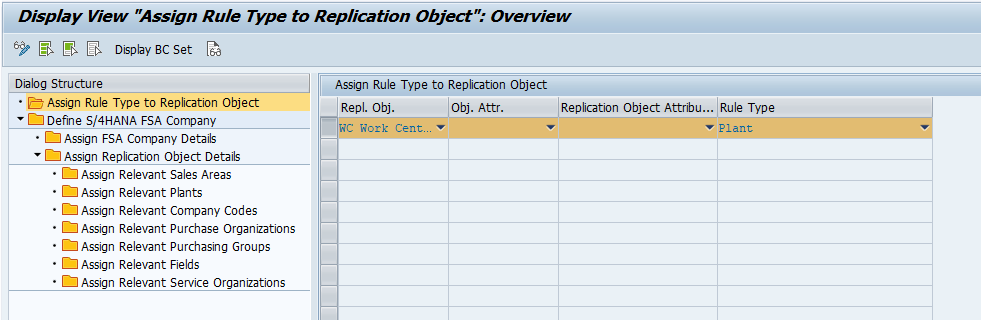
Select the Work Center Replication Rule ‘WC'

The integration Supports Plant and All companies rule type which can be configured from here
'01' Belongs to Plant
'00' Belongs to All companies
Define the Respective Company Name and Assign Company Details

For plant-based execution select the corresponding replication object ‘WC'

Assign Required Plant in section ‘Assign Relevant Plants’

Work Center Replication Demo
Scenario: Once a Work Center is created or changed in SAP S/4HANA Cloud Edition it is automatically replicated to SAP Field Service & Asset Management.
Go to the Fiori App ‘Manage Work Centers’ and Create/Change work center

Click On Create

Input Work Center details

Click on ‘Save' Work center created

Check Replication in SAP FSA as Service Regions

Check log in app Message Monitoring Overview
AIF Namespace: /FSMPM
AIF Interface: WORKCT_OUT
Final Thoughts
Replicating Work Centers from SAP S/4HANA Cloud Edition to FSA keeps the resource model consistent across back office and field. Dispatchers plan against the same crews and workshops in S/4HANA, assignments land with the right team the first time, and the planning picture always reflects the backend — no manual re-keying, no guesswork.
With master data in sync, scheduling gets sharper, technicians get clearer direction, and the whole service operation runs a little smoother.
Source link