Greetings SAP Supply Chain Management community!
Release 2605 delivers meaningful innovations across the SAP Supply Chain Management portfolio—helping organizations improve visibility, increase efficiency, and respond faster to change. In this post, we highlight what’s new across key products and, more importantly, point you to the Release Navigator for Supply Chain Management, where you can explore detailed feature descriptions, walk-thru's, and enablement content to support your adoption journey.
Table of Contents
What’s New in SAP Supply Chain Management
SAP Asset Performance Management
SAP Asset Performance Management strengthens Asset Health and Indicator Monitoring by improving transparency and troubleshooting. Enhancements make it easier to understand rule execution, data set usage, and indicator behavior, while tighter integration with maintenance notifications and orders helps connect asset health trends to real operational actions.
🔗Review feature details, walkthroughs, and guidance in the Release Navigator for SAP Asset Performance Management.
SAP Business Network
Updates in SAP Business Network focus on usability, scalability, and accuracy. Confirmation workflow filtering is more flexible, reporting capacity has increased significantly, and service procurement and integration scenarios are better supported—ensuring smoother collaboration between buyers and suppliers.
🔗Explore the latest feature documentation and adoption resources in the Release Navigator for SAP Business Network.
SAP Digital Manufacturing
SAP Digital Manufacturing delivers a major expansion of POD 2.0, enabling greater flexibility and control on the shop floor. Operators benefit from enhanced execution, reporting, and compliance capabilities, while manufacturers can leverage AI-assisted engineering, improved rule configuration, and stronger automation across production processes.
🔗Dive deeper into these innovations in the Release Navigator for SAP Digital Manufacturing, including guided resources for POD 2.0 and EBR scenarios.
SAP Field Service Management
Planning, dispatching, and intelligence capabilities in SAP Field Service Management continue to evolve with richer map-based tools, optimized assignment handling, and new AI-powered support via Joule. The release also expands configuration, extensibility, and language support—along with the solution’s relaunch.
🔗Learn how to enable and apply these features in the Release Navigator for SAP Field Service Management.
SAP Integrated Business Planning
SAP Integrated Business Planning introduces enhancements across administration, integration, planning, and analytics. Improved system operations, stronger SAP Datasphere integration, expanded real-time capabilities, and new planning and scenario features help organizations plan with greater precision and confidence.
🔗Access curated feature explanations, activation steps, and enablement assets in the Release Navigator for SAP Integrated Business Planning.
SAP Integrated Product Development
SAP Integrated Product Development enhances collaboration, formulation, and specification management, with added AI-powered search, improved workflow governance, and a more streamlined user experience. These updates help teams work more efficiently across complex, cross-functional product development processes.
🔗Explore full feature details and guidance in the Release Navigator for SAP Integrated Product Development.
SAP Logistics Management
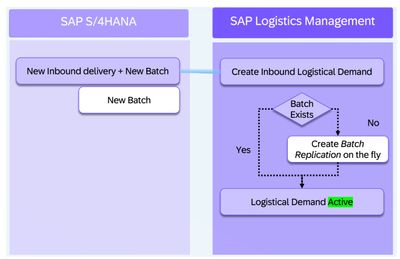
Enhancements in SAP Logistics Management improve integration, transparency, and execution across outbound, warehouse, and configuration processes. New navigation, scheduling, and data consistency improvements help streamline daily logistics operations.
🔗Find detailed documentation and activation guidance in the Release Navigator for SAP Logistics Management.
What’s New in the Release Navigator
Guided Walk-Thru Tutorials for SAP Integrated Business Planning
The new SAP Integrated Business Planning walk-thru's focused on upgrade tools are designed to help customers navigate upgrades with clarity and confidence. These guided experiences focus on how to assess upgrade impacts, validate key data and integration changes, and apply recommended checks before and after moving to a new release, reducing risk while keeping planning processes running smoothly. All upgrade-focused walk-thru's can be found on the Get Assistance page within the Release Navigator, where they are organized alongside supporting documentation and best‑practice guidance.

Connect with Us
Your feedback helps shape future Release Navigator content. We encourage you to:
- Complete our feedback survey
- Share ideas or questions in the comments
- Learn more about the Readiness@Scale team
- Explore additional SAP enablement content
Thank you for your continued engagement.
Best Run,
Readiness@Scale
SAP Enterprise Support