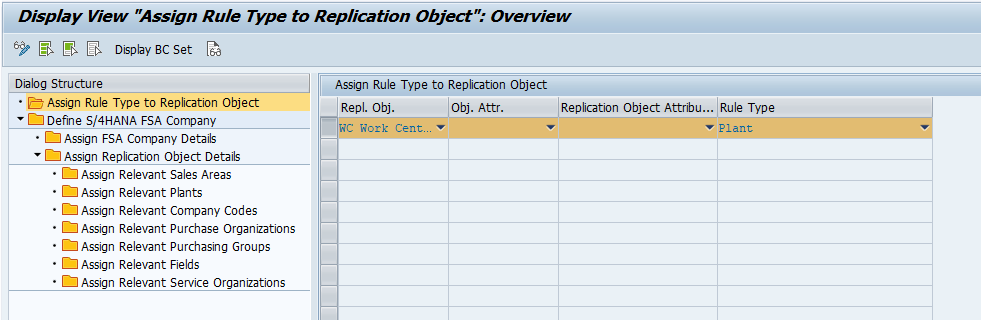
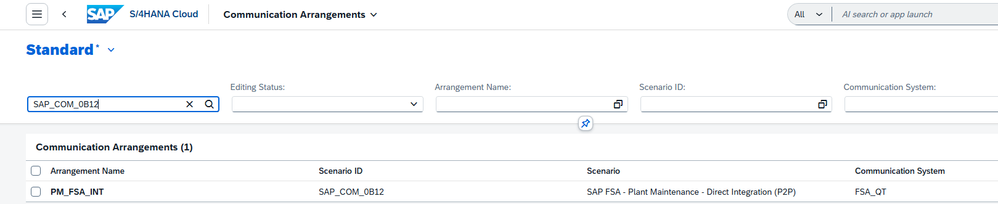
The goal of this Integration is to ensure that users in SAP FSA to have the right permissions for access to business objects based on the organizational levels they are assigned in SAP S/4 HANA. Both Initial and Delta load are supported.
In the past we have supported only Legacy Org Integration to FSA and with this new Integration, we support Enterprise Service org Integration as well providing the flexibility to the customers to choose the right organizational model that is applicable for them.
There are two parts to this Integration:
- Part-1:Integrate the SAP S/4HANA Enterprise Organizational model/hierarchy to SAP FSA. Any changes or deletions to organizational units will be synchronized back to SAP FSA.
- Part-2: Assign these organizational levels to technical objects (master and transactional) to ensure that appropriate access is granted to the users in SAP FSA
Part-1: Enterprise Service Org Integration from SAP S/4 HANA to SAP FSA
How to enable Enterprise Org Model?
Path: SAP Customizing Implementation Guide -> Service -> Basic Functions -> Enterprise Organizational Management -> Enable Enterprise Organizational Model

Enterprise Org Definition – This is required for Enterprise Service Org integration and also assignment determination of Ent. Service Org to assign to Business objects
Path: SAP Customizing Implementation Guide -> Enterprise Structure -> Definition -> Service -> Define Enterprise Service Organization
- Define the Enterprise Service orgs, Hierarchies, Plant, Storage location, Service Profiles, Planning Plant in below path.

Sales Area Assignment – This is required for determination of Enterprise service org for assignment to Business objects(Master and Transaction Data)
Path: SAP Customizing Implementation Guide -> Enterprise Structure -> Assignment -> Service -> Assign Standard Enterprise Service Organization to Sales Area
- Define the Sales area w.r.t enterprise service org in below path

Fiori App: Manage Teams and Responsibilities – SAP Fiori Apps Reference Library – Use this app to create service teams, assign service orgs and service employees to the teams. Business role: SAP_BR_BUSINESS_PROCESS_SPEC (Business Process Specialist)
How the Manage Teams and Responsibilities app looks like in SAP S/4 HANA?
- Create a service Team ‘0101_000’
- Select Category as ‘Service’ as only that relevant for FSA Enterprise Service Org integration
- Team Type is configurable.
- In the Responsibility Definitions view, maintain the Enterprise Service Org
- In the Team Owners and Team Members views, assign the relevant service employees, and as function for the team members choose Executing Service Employee:

Team Types under Team category – ‘Service’ can be configured in below path
Path: SAP Customizing Implementation Guide -> Cross-Application Components -> General Application Functions -> Responsibility Management -> Teams and Responsibilities -> Team Categories -> Define Team Types

Functions classification for Team Category – ‘Service’ can be configured in below Path:
Path: SAP Customizing Implementation Guide -> Cross-Application Components -> General Application Functions -> Responsibility Management -> Teams and Responsibilities -> Team Categories -> Classify Functions for Team Category

Pre-requisites to Integrate to SAP FSA:
- The minimum SAP S/4HANA version must be 2025 FPS02
- DRF, RFC, Oauth Profile Setup, Client id, Client secret generation.
- IMG Configurations
- Service Employees assigned under Responsibilities Definition should be available in FSA.
How the Enterprise Org Structure looks like when replicated to SAP FSA?
Service teams will be assigned under Enterprise Service Org’s and Service Employees assigned in Teams and responsibilities Fiori app will be displayed under User Assignments.

Default Flow: User Assignments->Enterprise Service Team->Enterprise Service Org
Additional Flow (Configurable)
- Default flow will remain as is, in addition below is supported.
- User Assignment (Team Members, Team Owners) -> Enterprise Service Org
Note: For Assignment of Team Owners to Ent Srv Team – Maintain Team Type and Assign Team to ESrvOrg. – SRVTEAMOWN (Service Team Owner). For Assignment of Team Members – Maintain Team Type and corresponding Member Function in below Path
Path: SAP Customizing Implementation Guide -> Service -> Integration with Other SAP Solutions -> SAP Field Service and Asset Management -> Master Data Replication -> Enterprise Organization -> Configure Business Partner assignment to Enterprise Service Org

Extensibility: To provide further flexibility on assignment of service employees to only Enterprise Service Org and skip Service Teams, Below BADI is provided.
Business Context: “CRMS4_FSM_EORG_SRVTEAM”
Enhancement Spot | BADI | Description |
ES_CRMS4_FSM_EORG_INT | CRMS4_FSM_SKIP_SRVTEAM | Skip Service Team Replication to FSA |
The Custom Logic Fiori app lets you implement, activate, and transport BAdIs entirely from the browser — making it upgrade-stable, cloud-ready, and accessible without broad developer authorizations.
Configurations to Integrate Enterprise Service Org’s and related data to SAP FSA:
- IMG Configurations.
- RFC, OAuth, Client Id and Client Secret generation.
- DRF Configurations.
IMG Configurations:
Path: SAP Customizing Implementation Guide -> Service -> Integration with Other SAP Solutions -> SAP Field Service Management -> Configure Integration
- Enable Enterprise Org Repl should be true for FSA Integration
- Only Single company is supported, Maintain X-Account-ID and X-Company-ID in below
- Specify the RFC destination that is created to establish the connection to FSA.
- Specify the EntOrgS4CompanyID as “00001” as this is supported only for single company

RFC, OAuth, Client Id and Client Secret generation:
T-code: SM59 – To create RFC Destination

Maintain Oauth Profile in Login & Security

T-code: /oSOAUTH2_CLIENT – Creation of Oauth Profile – Maintain Oauth 2.0 Client ID & Secret here


Oauth Client Id and Secret should be generated in FSA Admin portal and enable the respective companies.

DRF Configurations:
Tcode : DRFIMG
Navigate to Define Custom Settings for Data Replication Define Technical Settings ->Define Technical Settings for Business Systems,

Define Business systems, BO’s

Define Replication Model

Assign outbound Implementation for the replication model

Assign Target systems for Replication Model/Outbound Implementation

Enter the outbound Parameter – PACK_SIZE_BULK- ‘100’

Activate the Replication Model

How to Run Initial Load?
T-code: DRFOUT

DRF Filter Criteria:

Delta changes are triggered automatically once DRF Replication model is active, necessary configurations are done, no external trigger required.
T-code: DRFLOG – To check the DRF Logs. Example below

Part-2: Enterprise Org Assignment to Business Objects:
Assignment to below Master and Transaction data for below business objects is supported for FSA Integration
- Business Partners with Customer Role
- Employees
- Products
- Equipment’s
- Service Order
Pre-requisites:
- Enterprise Service Orgs/Service Teams should be available in FSA
- Enterprise Org Definition and Sales Area Assignment should be done in IMG Config
- CPI Configurations to enable enterprise org assignment.
Business Partners with Customer Role:
- Using the sales area in BP Customer, the relevant Enterprise Service Orgs will be determined based on mapping in Sales Area Assignment and correspondingly Service Teams are determined and assigned in FSA.

Employees:
- In SAP S/4HANA, the employees are assigned to service teams using ‘Manage Teams and Responsibilities’ app. The unit to which this employee is assigned(via the position) will be assigned as organizational level of the Person in SAP FSM.
Products:
- When Sales area is assigned relevant Enterprise Service Orgs and Service Teams are determined and assigned
- When Plant/Storage Loc. is assigned relevant Enterprise Service Orgs and Service Teams are determined and assigned
- When both Plant/Storage Loc. and Sales area is assigned, Sales area takes precedence and relevant service orgs and teams are determined and assigned.


Equipment's:
- When Sales area is assigned relevant Enterprise Service Orgs and Service Teams are determined and assigned
- When Planning Plant is assigned relevant Enterprise Service Orgs and Service Teams are determined and assigned

- When both Planning Plant and Sales area is assigned, Sales area takes precedence and relevant service orgs and teams are determined and assigned.
Service Order:
- After setting up Enterprise Organizational Management, in the service order, Service org and Service Team will be assigned.


CPI Configurations to enable Enterprise Org Assignment to Business Objects:
- Business Partners, Products, Service Order Enterprise org assignment happens via IFLOW.
- Enter the connection details on Configure -> Receiver -> S4Hana_EntOrgLevel on above iflows

- To enable enterprise org, set ‘true' on Configure -> More -> ‘Enable Enterprise Org Assignment' in below iflows.


Conclusion:
The Enhanced Enterprise Service Organization Integration and assignment to Master and Transaction Data empowers organizations to implement sophisticated service organization assignment strategies that align perfectly with their unique business requirements.
This feature is now available in SAP S/4HANA 2025 FPS02 ready to transform how your organization manages service transactions and organizational assignments.
References:
- Integration with SAP Field Service and Asset Management | SAP Help Portal
- Configure Data Replication Framework for Business Objects | SAP Help Portal
- Field Mapping | SAP Help Portal
Source link