Dear All,
Hope you are doing fine.
We are excited to share news about the Best Practices package for Time Management 2H 2026 via the upgrade center. We have some new features (new country localization for Time Tracking) along with enhancements for existing countries.
Disclaimer: Please note these features are currently available only on preview. The final version will be updated on RTC or production date for 2H 2026.
But before starting, let us share how you can find our Best Practices packages. In the Upgrade Center, filter for SAP Best Practices, and observe that the packages are listed under Recommended Upgrades:

Updates in Time Off
Australia Time Off Enhancements
We are excited to share the next chapter for Long Service Leave (LSL) in Weeks for Australia as part of the Best Practices package for Time Management 2H 2026 via the Upgrade Center.
In the 1H 2026 release, we introduced LSL in Weeks for New South Wales (NSW), South Australia (SA), and the Northern Territory (NT). With the 2H 2026 release, coverage extends to the remaining five states and territories:
- Australian Capital Territory (ACT)
- Queensland (QLD)
- Tasmania (TAS)
- Victoria (VIC)
- Western Australia (WA)
LSL in Weeks for Australia is now fully supported across all states and territories as part of the Best Practices package for Time Management 2H 2026, available via the Upgrade Center.
A key change in this delivery is the consolidation of common rules across jurisdictions — rather than creating separate, identical rules per state, shared rules now apply where applicable. The accrual transfer date rule is one example of this consolidation.

The configuration approach follows the same steps as in 1H 2026.
For more details, please have a look at our workbook available on the SAP help portal; you can also download it from the upgrade center to review the content.
And don’t hesitate to use the updated Australia Time Off Best Practices package by deploying the content using Upgrade Center.

Updates in Time Tracking
Time Tracking Sample Solution for United States – California
With the 2H 2026 release, we are introducing a new localized Time Tracking sample solution for California. Built with input from our Professional Services colleagues, it covers the rules needed to handle overtime, meal break, and rest period scenarios specific to California labor law.
Given the high demand for this solution from customers, we have dedicated a separate blog post to it — find all the details here: California Time Tracking with SAP Best Practices: From Overtime to Meal Waivers.
Collision Handling for Absences and Attendances
Until now, collision resolution in SAP SuccessFactors Time Management was limited to overlaps between absences only — for example, when a sickness absence needed to replace an existing vacation. With the 1H 2026 release of the Product, this capability was extended to handle overlaps between absences (time off) and time sheet records (attendance and on-call). Best Practices incorporates this and delivers the feature as part of the 2H 2026 release.
In practice, overlapping absences and attendances are a common occurrence — think of an employee who takes a half-day off but then needs to join an urgent meeting, or an on-call shift that partially overlaps with planned time off.
You can now configure how the system reacts when an employee records working time that overlaps with an already-submitted absence — or vice versa. This gives organizations the flexibility to handle real-world scheduling conflicts accurately and transparently.
Let's walk through a practical example using an employee with a clock-time based time recording profile. The employee requests personal leave for few hours but then returns earlier as expected to work. Both the time types have collision groupings maintained:


- Submit an Absence
The employee submits an absence request — in this case, a half-day time off on Sep 22, 2026, from 8:00 AM to 1:30 PM.
- Record Overlapping Working Time
Next, the employee records working time on the same day that overlaps with the absence — specifically, an attendance entry on Sep 22, 2026, from 1:00 PM to 5:30 PM.
Notice that the absence runs until 1:30 PM, while the attendance starts at 1:00 PM, creating a 30-minute overlap. - System Issues a Warning
Upon saving the time sheet entry, the system automatically detects the collision and issues a warning message:
“The system automatically resolved a collision between an absence on Sep 22, 2026 from 8:00 AM to 1:30 PM and an attendance on Sep 22, 2026 from 1:00 PM to 5:30 PM. Please verify your time sheet, and update or cancel the absence if required.”

- Resolve the Overlap
Previously, the employee had to cancel the entire absence and re-submit it with a shorter period. Now, the employee can adjust the absence directly in the time sheet to end at 1:00 PM — eliminating the overlap with the attendance record.

Once the absence is updated, the warning message disappears from the time sheet, confirming that the collision has been fully resolved.


This update is available in the SAP Best Practices Time Tracking Setup:

Attendance Quota – Pre-Approved Time Allocations
With the 2H 2026 release, Best Practices now incorporates support for Attendance Quota in SAP SuccessFactors Time Tracking. This feature allows organizations to manage pre-approved time allocations — such as overtime, on-call hours, or special work arrangements — by granting employees a defined quota before they record working time. In the Best Practices package, the focus is on overtime as the delivered attendance quota scenario.
Rather than correcting time entries after the fact, managers can proactively approve overtime quotas through a built-in workflow, bringing governance and transparency to the time recording process.
For a detailed overview of the concept and configuration, refer to the dedicated product blog: Managing Pre-Approvals Using Attendance Quota in SAP SuccessFactors.
Let's walk through a practical example to see the end-to-end flow in action.
In our example, the employee has a clock-time based work schedule for which scheduled breaks are added automatically based on the recorded working time:

- Employee Requests Attendance Quota
The employee submits an overtime attendance quota request. This triggers an approval workflow to the manager.

On the employees’ profile, the attendance quota is in status Pending:
- Manager Approves the Request
The manager reviews and approves the quota:
The employee now has an active overtime attendance quota available on their profile:
- Record Working Time on a Day with Quota
The employee records working time on a day where the attendance quota is active.

The remaining quota updates correctly, showing 45 minutes remaining after partial use.

- Record Working Time on a Day with Quota but outside the approved time range
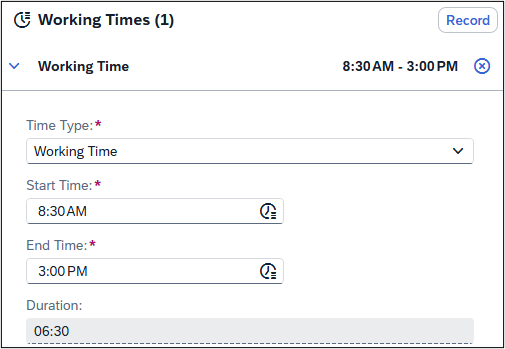
When the employee attempts to record working time on a day with an active attendance quota but outside the time range approved for that day. In this example, the End Time Restriction is at 7:00PM, but the employee records until 7:01PM:
In this case, the error message “You have recorded time outside range” is issued and the employee is unable to submit the time sheet:
- Record Working Time Without Available Quota
When the employee attempts to record working time on a day where no attendance quota is available, the system issues the error message “No attendance quota exists for the user as of the recorded time date”:


With Attendance Quota, organizations move from reactive correction to proactive approval — ensuring overtime is governed, transparent, and within pre-agreed boundaries before time is ever recorded. This update is available in the SAP Best Practices Time Tracking Setup.
New Design for Time Statements
With this release, the visual design of the Time Statement document has been refreshed.
What changed?
The previous Time Statement used a narrow, portrait-oriented layout. While functional, the look and feel were dated.
The new design features a clean, modern layout with a structured dark navy header and improved readability. The document is now wider and better balanced, making it easier to scan at a glance — whether employees are reviewing their own records or managers are conducting approvals.
How it Looked Before

How it Looks Now

No configuration changes are required — the updated design ships automatically as part of the best practices content for Time Statements:

The SAP Best Practices add significant value in terms of accelerating your implementations and we hope to see more adoption from you (partners) in the coming days.
If you have feedback, please do leave a comment below.
Thank you for your attention.
Best regards,
Monica and Mohan
Source link